Guides / Video workflow
MOFO copy trading: setup, speed test & wallet research
A simple guide to copying FOMO traders with MOFO, understanding the settings and finding wallets worth following.
I may earn a commission if you use the MOFO, FOMO or GMGN links on this page. That does not change the risks or make any trader profitable.
MOFO is a Telegram bot that automatically copies traders from FOMO. You choose the trader, choose how much to buy and set the rules. When that trader buys or sells, MOFO reacts for you.
Do not blindly copy my FOMO account. I use it for content and experiments. A coin appearing there is not me telling you to buy it.
What actually happens
A trader you follow makes a trade on FOMO.
MOFO sees the trade and reacts automatically.
Your amount, slippage, filters and exit settings are applied.
If the trader makes money, your copied trade can make money too.
That is the whole idea. Doing this manually is basically impossible because by the time you see the FOMO notification, open a trading app, find the token and press buy, MOFO can already be in the trade.
In the example from my video, MOFO copied the trade about two seconds after the original trader. That is fast enough to show why a human cannot realistically compete with it by clicking manually. It does not mean every copy will land in exactly two seconds.
And yes, the copy works both ways: if the trader buys garbage or gets dumped on, you can lose money automatically too.
How to set it up
- Open MOFO and finish the setup inside Telegram.
- Add funds to the wallet MOFO creates for you. Start with an amount you are completely fine losing.
- Type
/copytrade. - Add the FOMO trader you want to copy. MOFO can look up a supported FOMO username for you.
- Choose how much each copied buy should use.
- Set your trade rules and turn the copy on.
Before switching it on, know three numbers: how much one buy can use, how much price movement you allow, and how you will stop copying the trader.
The settings in normal English
Slippage
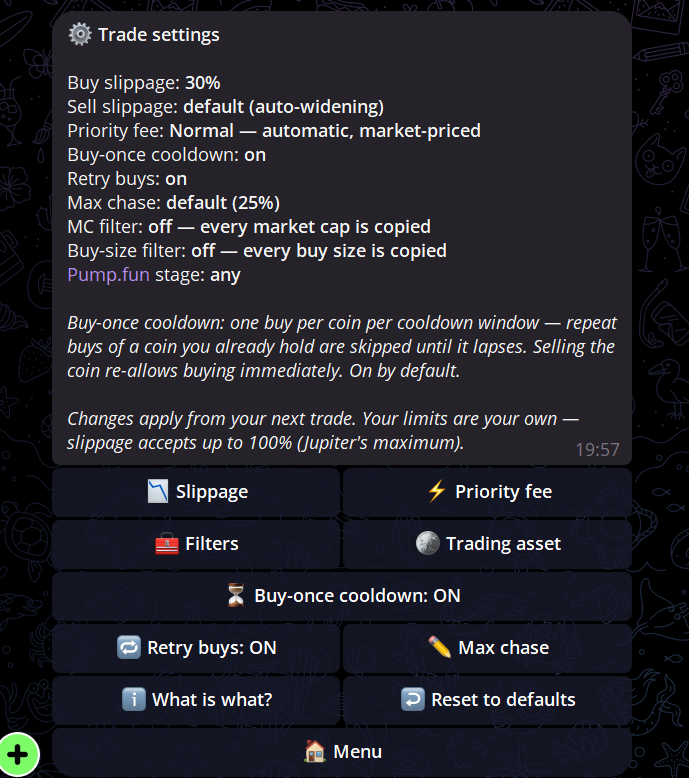
How far the price is allowed to move before MOFO refuses the trade. Buy and sell have separate limits. More slippage can get more trades through, but it can also give you a much worse price. The screenshot shows 30% buy slippage; do not copy that number without understanding what it allows.
Priority fee
The fee used to get the transaction included faster. Normal adjusts automatically with the market. Fast, Turbo or Custom use a fixed minimum fee per trade. Faster settings can cost more.
Buy-once cooldown
Stops the same trader from making you buy the same coin repeatedly within the cooldown period. If you already hold the coin, another buy signal is skipped until the cooldown ends. Selling the coin lets MOFO buy it again immediately.
Retry buys
If a normal buy fails on the first attempt, MOFO tries once more with wider settings. A sponsored buy retries the same transaction rather than spending twice.
Max chase
Stops you from buying after the price has already moved too far above the trader's entry. At the default 25%, MOFO refuses the buy if the quote is already more than 25% above what the trader paid.
MC filter
MC means market cap. Use this to copy only coins inside a market-cap range you choose. A trader-specific filter inside /copytrades replaces the global filter for that trader.
Buy-size filter
Copies the trade only when the original trader spent an amount inside your chosen range. This can filter out tiny test buys that were never meant to be serious positions.
Pump.fun stage
A Pump.fun coin is either still on the bonding curve or has graduated to an AMM. You can copy only pre-graduation coins, only graduated coins, or both.
You will also choose the amount used per trade and how sells are handled. Check those settings every time you add a trader. One setup will not make sense for every wallet or every coin.
How to find traders worth copying
There are three useful ways to do it.
1. Add a FOMO trader directly
Find a trader on FOMO, copy their username and let MOFO look them up. This is the quickest method when the profile can be resolved automatically.
2. Match the FOMO trades with a wallet on GMGN
Sometimes you want to find the actual wallet behind a FOMO profile. Pick a trade visible on FOMO and note the token, time and amount. Then open that token on GMGN and compare the wallet transactions shown there.
You are looking for a wallet that bought or sold the same token, at the same time, for roughly the same amount. Match more than one transaction before assuming you found the correct wallet.
3. Find ideas on FomoTop
FomoTop is an outside website that tracks FOMO wallets and ranks their token picks. It is another place to potentially find interesting wallets to research and copy.
The performance shown there may not be repeatable in a real account. Its results use its own tracking rules and simulated copy assumptions. Your entry, exit, fees and slippage can be different. Use it to find ideas, then check the trader yourself.
Five things I check before copying
One lucky coin can make a bad wallet look like a genius.
Check whether profit was actually taken or is still sitting in an open bag.
A wallet buying before everyone else may be impossible to copy at a similar price.
A large wallet can move thin liquidity and get results your smaller account cannot reproduce.
Know whether the trader sells gradually, dumps everything or holds forever.
The biggest green number is not automatically the best trader to copy. I want a wallet whose behaviour makes sense and can be repeated.
Proof from the video
These are the two Solana transactions from the speed example in the video. The first is the trader's FOMO transaction. The second is the copy made by MOFO about two seconds later. They are here as proof of the example—not as another task you need to complete.
What MOFO cannot fix
MOFO removes the slow manual clicking. It cannot turn a bad trader into a good trader. It cannot protect you from rugs, bad liquidity, terrible exits, stupid position sizes or a trader suddenly changing their strategy.
Use a small amount first. Know how to pause or remove a trader. Never leave a bot running forever without checking what it is doing.
This page and the companion video are for educational and informational purposes only. They are not financial, investment, legal, tax or individualized advice. Crypto, memecoins, automation and copy trading can cause rapid loss of some or all capital. You decide whether to act and are responsible for your own research, account security, settings, trades, taxes and losses. Adam Grabski does not control third-party platforms, wallets, smart contracts, liquidity, execution or outcomes. Examples and past performance do not guarantee future results.
Ready to try it?
Choose the trader. Set the rules. Let MOFO react.
MOFO handles the speed. You are still responsible for who you copy and how much you risk.
Crypto and copy trading can cause rapid loss of some or all capital. You are responsible for your settings, trades and losses.